

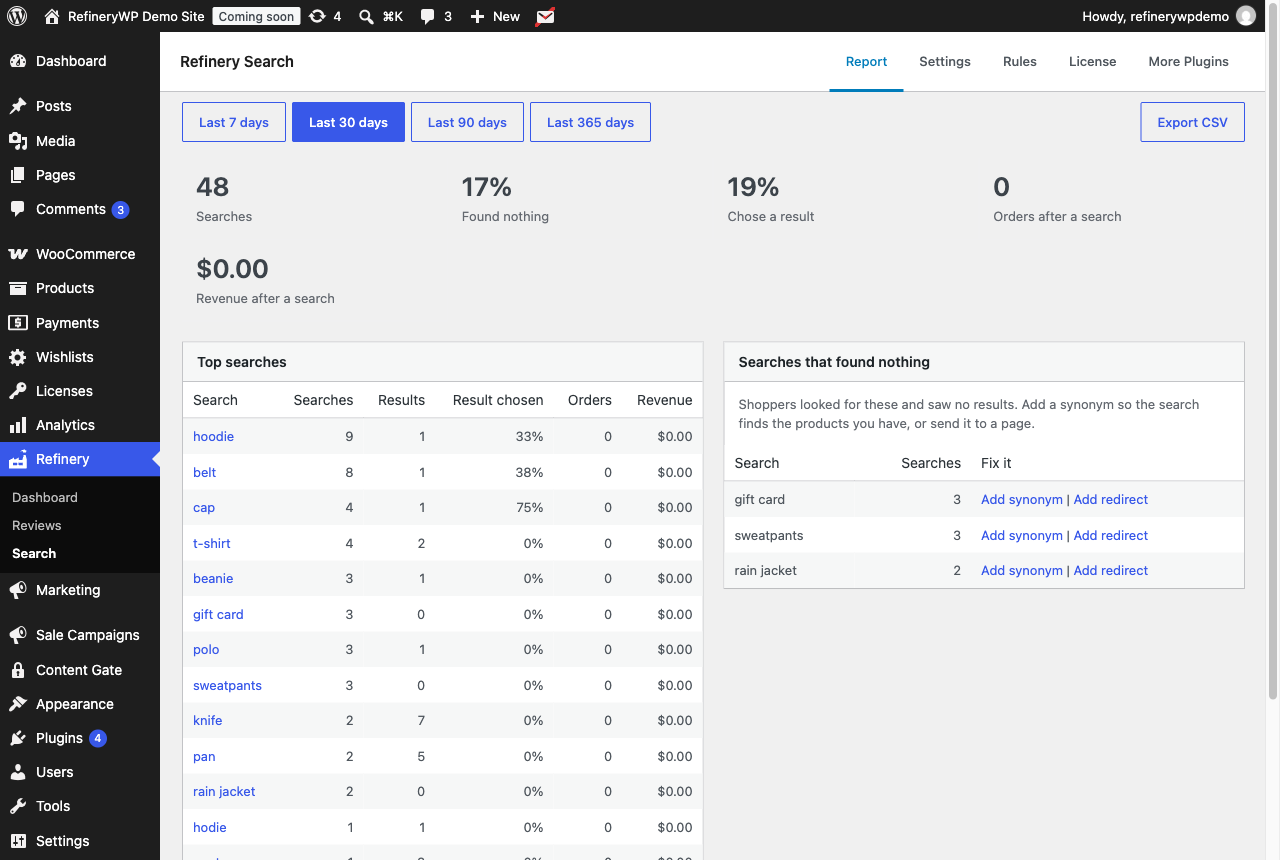
The search report shows what shoppers search for on the store: the most common searches, how many results each found, how often a result was chosen, and the searches that found nothing. Searches that found nothing are often products the store sells under another name, or products shoppers want and cannot find.
What is recorded
The words searched, how many results were shown, which result was chosen and when. No names, email addresses or IP addresses. A random ID kept in the shopper’s browser for the length of a visit links the searches of one visit together. Refinery Search adds suggested text for the store’s privacy policy under Settings > Privacy.
Reading the report
- Go to Refinery > Search > Report.
- The cards at the top show the number of searches, the share that found nothing and the share where the shopper chose a result.
- Top searches lists the most common searches. Click a search to open its results page on the store.
- Searches that found nothing lists what shoppers looked for and did not find.
Choose a period of 7, 30, 90 or 365 days at the top (30 by default). A Refinery Search card on Refinery > Dashboard shows the number of searches in the last 30 days.
Settings
Go to Refinery > Search > Settings > Search report. Record searches turns recording on or off, and Keep searches for sets how long searches are kept (365 days by default). Older searches are deleted automatically each night.
Sales from search and export
The report also shows:
- Orders after a search and Revenue after a search, in total and for each search.
- Export CSV, with every search in the period.
- Add synonym and Add redirect links next to each search that found nothing, which open the Rules tab with the search filled in.
How sales from search are counted
When a shopper searches, a cookie holding the visit’s random ID is set, and deleted when the browser closes. At checkout, the ID is saved on the order in the same scrambled form the report uses. When the order is paid, each product in it is credited to the search it was chosen from, or else to the visit’s last search, if the search was within 7 days. Revenue is the line totals after discounts, before tax and shipping. Refunds are not subtracted yet.
With a cookie consent plugin that supports the WP Consent API, the cookie is only set once the shopper allows statistics. To stop counting sales, turn off Sales from search under Settings > Search report.
Troubleshooting
The report is empty
Check that Record searches is on. A notice at the top of the report says when it is off. Searches are recorded from the suggestions and the results page; searches by logged-in store managers are recorded too.